Have you ever felt the frustration of watching a stunning AI-driven product launch video, only to have your own Gemini prompts produce something that looks more like a 1990s PowerPoint transition than a modern masterpiece? The leap from mediocre output to production-ready content isn’t just about the model you use, but the architectural way you approach your prompts.
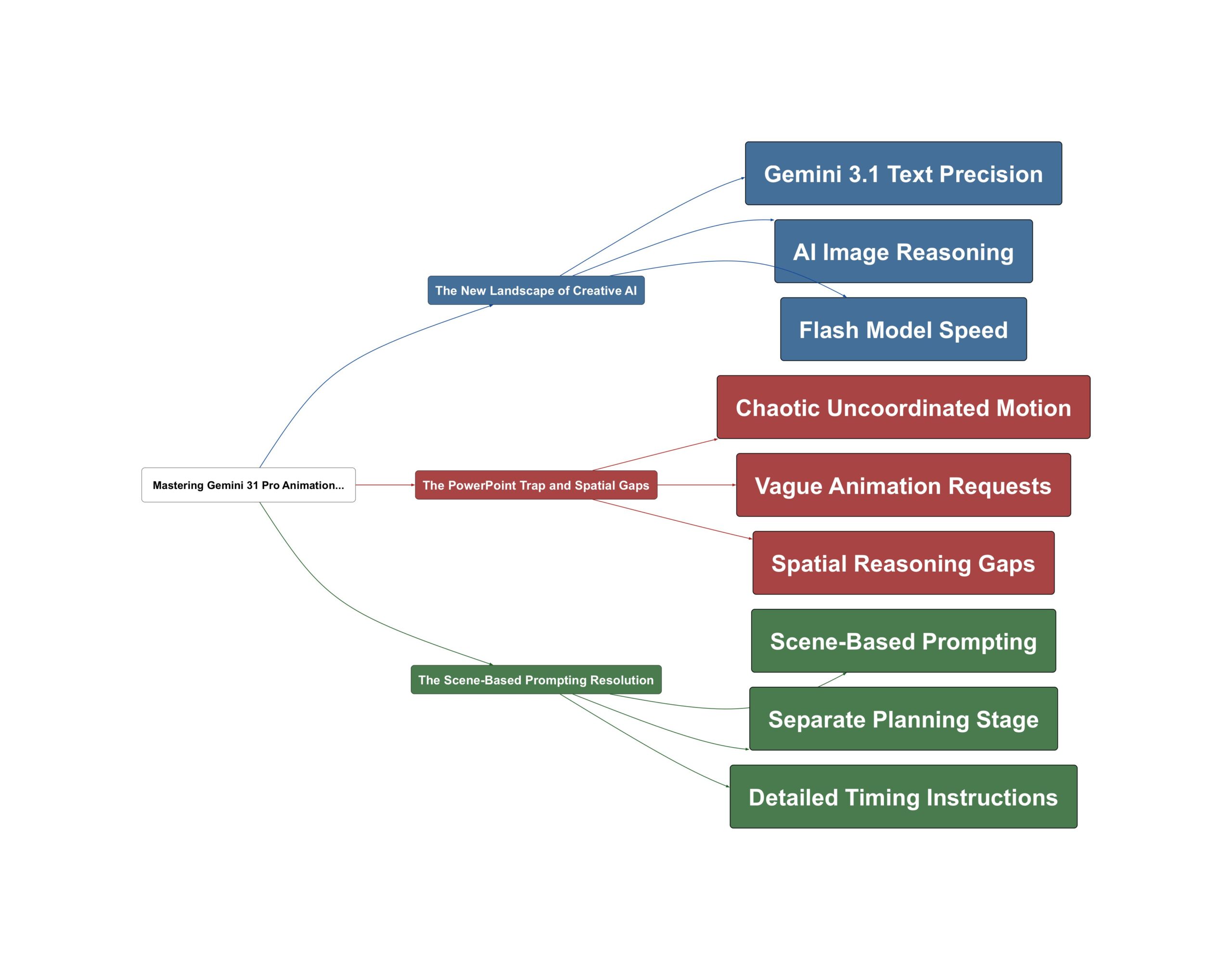
The New Landscape of Creative AI
The arrival of Gemini 3.1 Pro and the Flash model—affectionately dubbed ‘Nano Banana 2’ by some in the community—marks a significant shift toward smaller, faster, and more efficient creative tools. These models aren’t just faster; they bring a level of reasoning to visual tasks that was previously reserved for much larger systems. One of the most impressive features of this new generation is its ability to handle complex text rendering and translation within images with startling accuracy.
This model is extremely good at text. So if you look at it, it gets all the text there fine… these are two of the main sort of features that they’ve focused on: this whole idea of basically getting precise instruction following as well as precise text rendering and translation.
— Sam Witteveen
Building on this foundation, creators are finding that the models can now follow multi-step logical instructions. Whether it is asking a cat to hold a sign or translating that sign into Thai while maintaining the visual context, the reasoning capabilities are now robust enough to handle nuanced requests that involve both spatial awareness and linguistic precision. The power of these models lies in their ability to act as both a creative engine and a logical processor.
The PowerPoint Trap and Spatial Gaps
Despite these advancements, many users still struggle to get high-quality animations. Why does this happen? The core issue is often a lack of structure in the initial request. When we give a model a vague command like ‘animate this,’ we are asking it to perform complex spatial reasoning that it isn’t specifically trained to handle in a vacuum. This leads to what experts describe as chaotic and uncoordinated efforts that fail to meet professional standards.
One of the key reasons your animation generated by model is bad is because you’re giving a vague and open-ended request like animate this or make a prop which leads to chaotic uncoordinated motions and efforts. Especially for animation it is complicated task require a lot of spatial thinking which model is not specifically trained at.
— AI Jason
Sound familiar? The complication is that we often treat AI as a mind-reader rather than a technician. Without a clear map of how a UI state should change over time, the model defaults to the simplest, often clunkiest, interpretation. This gap between our vision and the model’s spatial execution is the primary barrier to ‘epic’ results.
The Scene-Based Prompting Resolution
To bridge this gap, the most effective strategy is to separate the planning phase from the building phase. Instead of one giant, messy prompt, the solution lies in creating a structured ‘scene-based prompt.’ This approach takes the spatial thinking away from the model’s guesswork and puts it into a clear, technical framework. A professional-grade animation prompt should be composed of four distinct elements: timing, defined UI states, specific actions, and special keyword effects.
The key concept here is basically two things. One is that when building animation you absolutely want to plan first… from the planning you should get a scene based prompt the detailing timing and UI state.
— AI Jason
How do we implement this in practice? Start by defining exactly how long each scene should last and what the frame should contain at the beginning and end of that duration. Use specific technical keywords like ‘3D perspective rotation’ or ‘staggered delay’ to guide the motion. By providing this level of detail, you empower the model to focus on implementation rather than trying to figure out the ‘story’ on the fly. This structured workflow, combined with the faster speeds of models like Gemini 3.1 Flash, allows for rapid iteration and professional-grade results that are truly production-ready.
💡 Key Takeaway: Separate animation planning from building using structured, scene-based prompts for pro results.
Video Sources